I recently setup cacti at work and at home. The rpmforge yum repository made it easy to install and a snap to setup. At work, with an assist from the other guys on the Systems team, there are 143 hosts - over 1500 data sources - being polled and the setup was pretty damn quick. However, it initially scaled like a pig - it brought a dual-core Opteron 242 with 2GB of RAM to it's knees. However, moving to using cactid and tweaking the proc/threads/php max memory helped a ton. What I especially liked is that when php crapped out due to the default memory restrictions, I didn't lose all the data for the hour or so it took me to debug the problem. It was "cached" in the MySQL database and then flushed to the RRD files once php was working again.
Additionally, I wrote an "apache_stats" plugin in C that polls apache's server-status page using libcurl and easyregex. I'd like to release the code to the public, but I'll have to discuss it with my new employers.
At home, I'm seeing some odd results when polling the net-snmp agent on my wireless routers. The old WRT54Gv2.2 is just fine, but my WRTSL54GS is very inconsistent when returning data... whole hours of the day are missing. I'll have to investigate more.
2007-08-10


2007-07-07
bad timing
Previously, I had my fileserver sync time with my primary wireless router and some pool.ntp.org servers. Then I noticed this:
I've now switched it around. My routers now sync with my fileserver and us.pool.ntp.org. My fileserver ignores the access points and syncs with:
Jul 7 08:41:10 remote /usr/sbin/ntpd[521]: skew change 255.181 exceeds limitAccording to the documentation, there's no real-time clock on most OpenWrt compatible hardware. I guess when you consider the minimalistic setup of these devices, you can't expect everything.
Jul 7 08:56:48 remote /usr/sbin/ntpd[521]: skew change -34.707 exceeds limit
Jul 7 09:24:28 remote /usr/sbin/ntpd[521]: adjusting local clock by -0.159868s
Jul 7 09:24:28 remote /usr/sbin/ntpd[521]: skew change -32.121 exceeds limit
Jul 7 09:39:06 remote /usr/sbin/ntpd[521]: adjusting local clock by 0.465410s
Jul 7 09:39:06 remote /usr/sbin/ntpd[521]: skew change 132.634 exceeds limit
Jul 7 09:44:23 remote /usr/sbin/ntpd[521]: adjusting local clock by 0.727679s
I've now switched it around. My routers now sync with my fileserver and us.pool.ntp.org. My fileserver ignores the access points and syncs with:
server timex.cs.columbia.eduThose are the same NTP servers I use at work, with 3 pool.ntp.org servers thrown in. It just annoys me that OpenNTPD doesn't have the equivalent of "ntpq -p" to check the status of the NTP sync.
server ntp-2.cso.uiuc.edu
server ntppub.tamu.edu
server ntp-1.vt.edu
server ntp3.cs.wisc.edu
server 0.pool.ntp.org
server 1.north-america.pool.ntp.org
server 2.us.pool.ntp.org
2007-07-04
Remote backups with rdiff-backup
I set this up a while back, but I needed to make some notes on my setup of rdiff-backup that backs up my colo'd PC to my home fileserver. I've been using it for more than 3 months and it has done a great job - space efficient, time efficient and bandwidth light. I followed the recommended unattended HOWTO and it was easy to setup - even with different OSes (Solaris x86 vs. CentOS), versions of ssh and versions of rdiff-backup itself. Only modifications were:
- In the authorized_keys2 on the source system, I didn't include the from="kitty" bit as the destination PC that I'm pulling from has a dynamic IP
- I included --print-statistics in the cron job's command line, redirected the output to a logfile
- I setup the three config files/scripts setup to have LogWatch tell me the daily summary of the rdiff-backup results. i.e.:
- /etc/log.d/conf/logfiles/nyc-backup.conf
- /etc/log.d/conf/services/nyc-backup.conf
- /etc/log.d/scripts/services/nyc-backup
- /etc/log.d/conf/logfiles/nyc-backup.conf
2007-04-02
done! (mostly)
At this point, I've mostly finished my WRTSL54GS project. The only thing left is the DMZ subnet, but as I don't have a server to put in it yet, it's not a big deal.
As I'm an ubergeek, I've created a network diagram of the new setup. As I'm a lazy geek, the diagram is, of course, not 100% accurate. I actually allocated a physical port on each OpenWrt box to be in the wifi vlan (vlan3), which I've been using to attempt to penetrate my wireless network with a knoppix install & nmap. Next I'll try something else - nessus or something more "black hat".
I intended to keep more notes here, but like I said, I'm lazy. Here's the highlights -
As I'm an ubergeek, I've created a network diagram of the new setup. As I'm a lazy geek, the diagram is, of course, not 100% accurate. I actually allocated a physical port on each OpenWrt box to be in the wifi vlan (vlan3), which I've been using to attempt to penetrate my wireless network with a knoppix install & nmap. Next I'll try something else - nessus or something more "black hat".
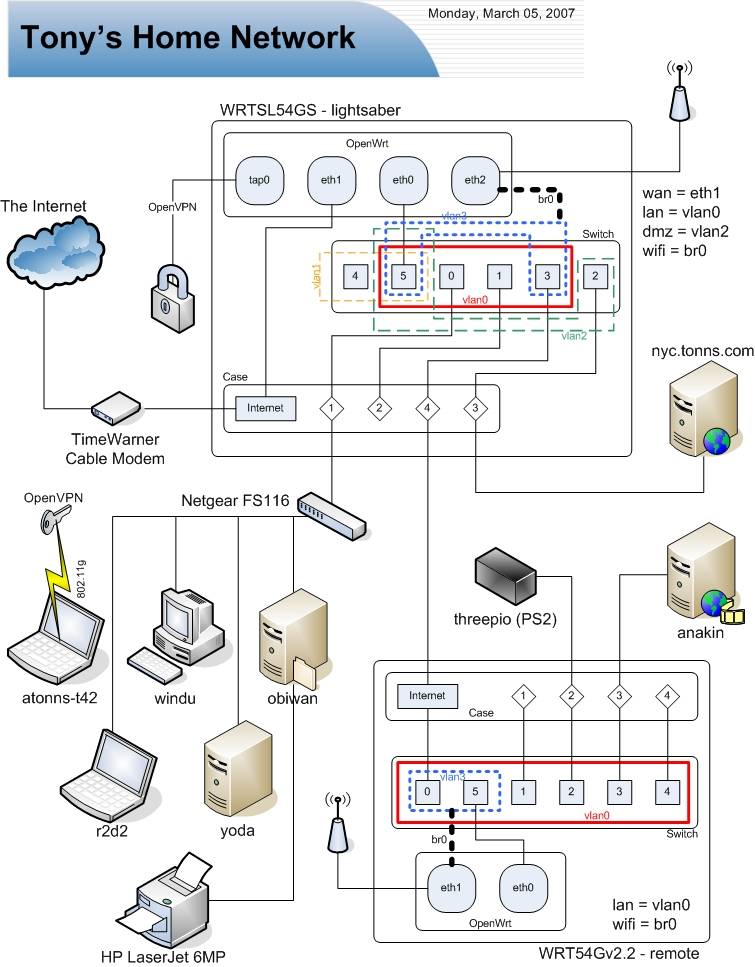
I intended to keep more notes here, but like I said, I'm lazy. Here's the highlights -
- shfs absolutely rules. it's easy to setup and makes backups a snap. the most difficult part was trying to get the passwordless auth to work. I *believe* I ended up generating the keypair with ssh-keygen on my CentOS box, compiling dropbear on CentOS and following some notes on how to convert the OpenSSH keys to the dropbear format using dropbearconvert. However, I did it on my previous OpenWrt install and since the backups worked so well, I've been using the same keys ever since.
- I'm being absolutely draconian about the usage of the wifi subnet, so I've setup iptables rules to DROP all packets from the wifi subnet to the other private subnets. For some reason, packets kept flowing when adding the -j DROP rules to the FORWARD table, so I've added them to the INPUT table (input_rule table on OpenWrt) and that's done the trick. I *think* it might be because they're coming from the bridge interface (wifi is br0 - a bridge between eth2 and vlan3) and not a direct interface.
- I have to sing the praises of OpenVPN once again, as well as the OpenVPN GUI for Windows. Reliable, secure, flexible, simple - what more could one ask for? I made the VPN'd wifi subnet one number higher in the third octet of my lan subnet, so it's now a /23 in my hosts.allow, etc. etc. instead of the /24 it used to me. Simple, yet secure.
- Setting up the second OpenWrt box as a WDS repeater was pretty simple, as the instructions are good. The major tweaks were:
- Had to comment out portions of /etc/init.d/S05nvram, as it kept on putting back default variables I wanted un-set
- Disabled S35firewall, S50httpd, S50telnet and S60dnsmasq as the other OpenWrt box is doing the majority of the work
- Created an S35noipforward script with the contents being "echo 0 > /proc/sys/net/ipv4/ip_forward" as we don't want to do routing across vlans on the repeater here - let it shuffle the packets on to the primary one.
- And of course, the vlan setup for the WDS repeater:
To be complete, here's the config for the primary router:root@remote:~# nvram show | sort | grep ^vlan
size: 1782 bytes (30986 left)
vlan0hwname=et0
vlan0ports=0t 2 3 4 5*
vlan3hwname=et0
vlan3ports=0t 1 5
OpenWrt port 3 of the primary is connected to OpenWrt port 0 of the WDS repeater. vlan tagging is awesome.root@lightsaber:~# nvram show | sort | grep ^vlan
size: 3887 bytes (28881 left)
vlan0hwname=et0
vlan0ports=0 3t 5*
vlan1hwname=et0
vlan1ports=4 5
vlan2hwname=et0
vlan2ports=1 5
vlan3hwname=et0
vlan3ports=2 3t 5
Subscribe to:
Posts (Atom)