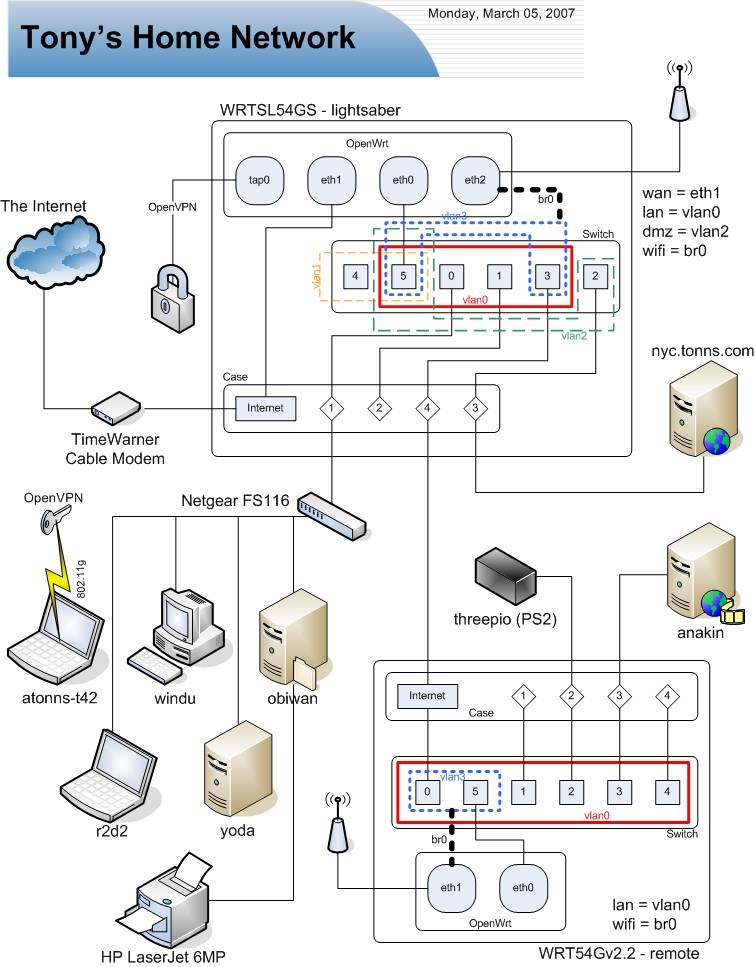
As I'm an ubergeek, I've created a network diagram of the new setup. As I'm a lazy geek, the diagram is, of course, not 100% accurate. I actually allocated a physical port on each OpenWrt box to be in the wifi vlan (vlan3), which I've been using to attempt to penetrate my wireless network with a knoppix install & nmap. Next I'll try something else - nessus or something more "black hat".
I intended to keep more notes here, but like I said, I'm lazy. Here's the highlights -
- shfs absolutely rules. it's easy to setup and makes backups a snap. the most difficult part was trying to get the passwordless auth to work. I *believe* I ended up generating the keypair with ssh-keygen on my CentOS box, compiling dropbear on CentOS and following some notes on how to convert the OpenSSH keys to the dropbear format using dropbearconvert. However, I did it on my previous OpenWrt install and since the backups worked so well, I've been using the same keys ever since.
- I'm being absolutely draconian about the usage of the wifi subnet, so I've setup iptables rules to DROP all packets from the wifi subnet to the other private subnets. For some reason, packets kept flowing when adding the -j DROP rules to the FORWARD table, so I've added them to the INPUT table (input_rule table on OpenWrt) and that's done the trick. I *think* it might be because they're coming from the bridge interface (wifi is br0 - a bridge between eth2 and vlan3) and not a direct interface.
- I have to sing the praises of OpenVPN once again, as well as the OpenVPN GUI for Windows. Reliable, secure, flexible, simple - what more could one ask for? I made the VPN'd wifi subnet one number higher in the third octet of my lan subnet, so it's now a /23 in my hosts.allow, etc. etc. instead of the /24 it used to me. Simple, yet secure.
- Setting up the second OpenWrt box as a WDS repeater was pretty simple, as the instructions are good. The major tweaks were:
- Had to comment out portions of /etc/init.d/S05nvram, as it kept on putting back default variables I wanted un-set
- Disabled S35firewall, S50httpd, S50telnet and S60dnsmasq as the other OpenWrt box is doing the majority of the work
- Created an S35noipforward script with the contents being "echo 0 > /proc/sys/net/ipv4/ip_forward" as we don't want to do routing across vlans on the repeater here - let it shuffle the packets on to the primary one.
- And of course, the vlan setup for the WDS repeater:
To be complete, here's the config for the primary router:root@remote:~# nvram show | sort | grep ^vlan
size: 1782 bytes (30986 left)
vlan0hwname=et0
vlan0ports=0t 2 3 4 5*
vlan3hwname=et0
vlan3ports=0t 1 5
OpenWrt port 3 of the primary is connected to OpenWrt port 0 of the WDS repeater. vlan tagging is awesome.root@lightsaber:~# nvram show | sort | grep ^vlan
size: 3887 bytes (28881 left)
vlan0hwname=et0
vlan0ports=0 3t 5*
vlan1hwname=et0
vlan1ports=4 5
vlan2hwname=et0
vlan2ports=1 5
vlan3hwname=et0
vlan3ports=2 3t 5